Key takeaways
- AngularJS still powers parts of some of the biggest apps in the world, including Gmail, YouTube, and PayPal, even though most new builds have moved to modern frameworks.
- Search engines struggle with client-rendered content by default, so an AngularJS app needs deliberate SEO work, not automatic ranking.
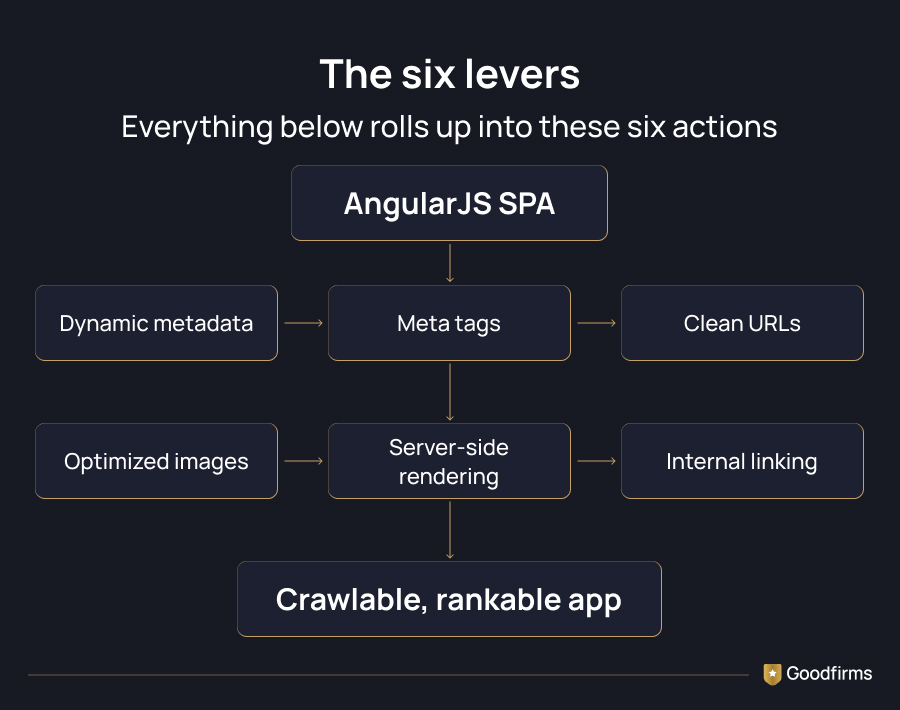
- Metadata, meta tags, clean URLs, optimized images, and server-side rendering are the five levers that decide whether your app shows up on Google.
- Internal linking and a clear sitemap still matter for single-page apps, just as much as they do for traditional websites.
- Getting this right usually takes a mix of frontend development skills and SEO know-how working together, not one or the other.
Quick Check: Is Your AngularJS App Actually SEO Ready?
Before you read another word, ask yourself one question. If you turned off JavaScript in your browser right now and reloaded your app's homepage, would you see any content at all, or just a blank white screen?
If your honest answer is "blank screen," you already have your reason for reading this blog. That blank screen is exactly what a search engine crawler sees on a poorly configured AngularJS app, and it is the single biggest reason SPAs get overlooked in search results.
Building an app takes real determination and real money. You need a sharp idea and a clear goal for what your app will do for the people using it. Web applications and single-page apps keep gaining ground because they feel fast and native, and AngularJS remains one of the frameworks developers reach for to build them, especially on projects that started years ago and never migrated away.
So the practical question isn't "should I use AngularJS?" Plenty of teams already have. The real question is: will Google actually crawl and rank an AngularJS app? Yes, it can, but only if you set it up the right way. Since most people now browse on their phones, and single-page apps tend to perform well on mobile, getting the SEO right pays off twice: once in rankings, and once in user experience.
Let's start with a quick refresher on the framework itself before we get into the SEO steps.
Already sold on the framework and just need hands to build it? Browse vetted AngularJS development companies and compare portfolios before you brief anyone.
An Overview of the AngularJS Framework
AngularJS was released by Google back in 2009 as an open-source framework for front-end development. It's a JavaScript framework best known for powering some of the earliest large-scale single-page applications and progressive web apps on the internet.
Because it's been around for over a decade, AngularJS has built up a large community, along with a wide set of tools and utility services around it. Developers use HTML, CSS, and JavaScript together to build fairly complex web apps without reinventing the wheel each time.
Apps built on AngularJS are called single-page applications, or SPAs, because the browser loads one HTML page and then updates content dynamically as the user navigates. There's no full page reload, which is part of what makes these apps feel quick and app-like.
AngularJS also made it easier to build cross-platform apps thanks to its responsive design, which helps with SEO indirectly since Google factors mobile friendliness into rankings. Given how many well-known apps still run on this framework in some form, it's worth looking at a few real examples before getting into the technical SEO steps.
AngularJS and JavaScript SEO Statistics
Modern Angular runs on about 0.3% of websites with a known JavaScript framework, per W3Techs, and AngularJS itself holds under 0.1% of that share today. Small numbers, but they hide how much of it runs inside high-traffic enterprise dashboards and internal tools most crawls never surface.
Google indexing JavaScript happens in two passes. Googlebot reads your raw HTML first, then queues the page for rendering, where its Web Rendering Service executes your JavaScript and captures what a real visitor sees. That second pass can take hours to weeks, which is exactly why content that only shows up after JavaScript runs is a real risk for Angular SEO and SEO for Angular applications generally, not just AngularJS.
Core Web Vitals matter too. Around 55% of websites pass all three thresholds, and mobile trails desktop noticeably. With over 64% of global web traffic now coming from mobile, a slow AngularJS app loses twice, once on Core Web Vitals score and once on mobile search share.
Real Apps Still Running On AngularJS
These platforms show what's possible when a single-page app is built and maintained well, and they also show why Single Page Application SEO matters at a genuine scale.
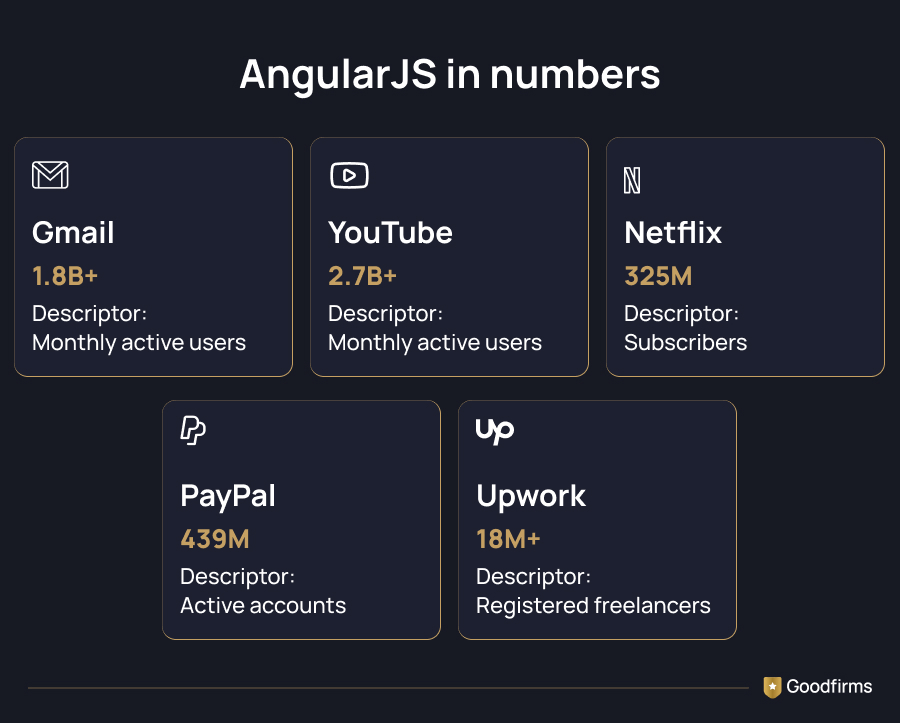
Gmail. Gmail still has over 1.8 billion active users every month worldwide, and it remains one of the most cited examples of a single-page app handling massive traffic without falling apart. It supports live data rendering, spell check, and predictive writing, all while keeping the interface fast.
YouTube. YouTube now crosses 2.7 billion monthly active users globally, and its web app continues to use progressive web app patterns that trace back to AngularJS-era thinking about single-page experiences. Few products illustrate the scale a well-built SPA can handle better than this one.
Upwork. This freelancing platform connects more than 18 million registered freelancers with hundreds of thousands of active clients across 180-plus countries. Features like in-app messaging, testing, and payment processing all run through the same single-page shell.
PayPal. PayPal now serves 439 million active accounts worldwide and processed close to 1.8 trillion dollars in payment volume last year. Both its web and mobile experiences depend on real-time transaction rendering, the same challenge any SPA developer has to solve for SEO and performance together.
Netflix. Netflix crossed 325 million subscribers by the end of last year, and its browsing interface still leans on many of the single-page principles AngularJS helped popularize, letting users scroll and preview content without a page reload breaking the experience.
If brands at this scale trust the single-page app model, it's worth asking what's actually pulling them toward it. If you're comparing frameworks before you commit to a stack, look for the best Angular frameworks for your project.
Why Developers Still Reach For AngularJS
A few reasons keep coming up when teams explain why AngularJS still gets used, especially on projects that already have a foundation built on it.
- Two-way data binding. Changes in the view and the model stay in sync automatically, which cuts down on the code you'd otherwise write by hand.
- Component-based structure. Reusable components save development time and keep the codebase easier to maintain over the life of a project.
- Dependency injection. Splitting tasks across services keeps different parts of the app from becoming tightly coupled to each other.
- Cross-platform reach. The same core logic can support progressive web apps, native mobile wrappers, and desktop shells, and teams that need native builds too often loop in mobile app development companies to handle that side of the project.
- A mature tool ecosystem. Years of community use mean there's a large set of existing libraries and utilities to draw from.
None of this solves SEO on its own, though. Teams building complex applications often partner with JavaScript development companies and AngularJS companies to ensure performance, maintainability, and search visibility are addressed from the start.
How To Make An AngularJS App SEO Friendly
Whether you're in fintech, ecommerce, or somewhere else entirely, every industry has apps racing to rank higher on Google. AngularJS isn't SEO friendly out of the box, since it renders content on the client side by default. Most of what follows falls under the broader umbrella of JavaScript SEO, and the good news is that server-side rendering, generally referred to as Angular Universal, closes most of that gap when it's set up correctly.
Here's what actually moves the needle.
1. Add Metadata That Crawlers Can Actually Read
Search engines send crawlers to read titles, meta descriptions, and other page metadata. If those crawlers can't retrieve that information, your page usually ends up ranking lower, even if the content itself is genuinely useful.
Since AngularJS apps render on the client side, users see the full page, but crawlers sometimes only see an empty shell unless you've configured things properly. That's the client-side rendering SEO problem in a nutshell: users get everything, crawlers might get nothing. Making your metadata dynamic, so it updates automatically based on the content being shown, helps crawlers catalog each view correctly instead of indexing one generic page over and over.
2. Set Up Meta Tags Properly
Clean indexing is one of the simplest wins in SEO, and it starts with meta tags in your HTML. AngularJS developers typically handle this through a metadata service that updates tags like title, description, and Open Graph data as users move between views.
The core actions you'll need across most implementations look like this:
- Update an existing tag when the view changes
- Add a new tag for pages that don't have one yet
- Remove tags that no longer apply
- Add multiple tags at once for efficiency
- Clean up leftover tag elements when a component unmounts
3. Use Clean, Dynamic URLs
The AngularJS router lets you build readable, user-friendly URLs instead of long strings of parameters. Shorter URLs with relevant keywords tend to build more trust with users, even though search engines rely less on URL structure than they used to.
Here's roughly how it plays out in practice. When a search request hits your server, the app first serves a server-rendered version of the page. Once that loads, AngularJS takes over on the client side, and the app continues running as an SPA for the rest of the session. Visitors get a fast, uninterrupted experience, and crawlers still get real content to index on that first request.
4. Optimize Every Image
Image optimization remains one of the more overlooked parts of SPA SEO. AngularJS's image processing libraries make it straightforward to resize and compress images without sacrificing visible quality.
Crawlers don't actually "see" an image the way a person does. They read the alt text you provide, so every image needs a clear, descriptive alt attribute if you want it to have any shot at appearing in image search results. Smaller, well-compressed images also help page load times, which is a ranking factor on its own.
5. Get Real-Time Rendering Right
AngularJS apps that lean heavily on API calls for data often struggle with SEO because there's nothing for a crawler to read until that data finishes loading. Server-side rendering, through Angular Universal or a similar setup, solves this by generating a fully rendered HTML page before it ever reaches the browser. This is Angular Universal SEO in practice, and it's the clearest example of server-side rendering SEO doing exactly what it's meant to do.
In 2026, Google treats pure client-side rendering as a real risk for content-heavy pages and recommends server-side rendering or static generation wherever possible. What used to be called dynamic rendering SEO, serving a pre-rendered version to bots while real users get the live app, is now treated as a stopgap rather than a long-term plan. The safest long-term setup pairs server-rendered HTML for your core content with client-side JavaScript layered on top for interactivity, rather than relying only on a workaround built for crawlers.
6. Strengthen Internal And External Linking
Internal and external linking is still one of the simplest ways to help both users and search engines move through your site. A clear sitemap gives search engines a map of every important page, and AngularJS has libraries built specifically to generate and maintain one.
You can also build dynamic pages that adjust based on what a user searches for, which adds relevance signals search engines pick up on over time. If SEO isn't your team's core strength, it's often faster to bring in SEO agencies that already understand JavaScript-heavy rendering setups, rather than learning it all from scratch mid-project.
So, Is AngularJS Still Worth It For SEO?
Here's the honest answer: AngularJS can absolutely rank well, but it needs more deliberate SEO work than a traditional multi-page site would. AngularJS SEO isn't one setting you flip on; it's six habits you keep up over the life of the app. None of the steps above is an optional extra. Metadata, meta tags, clean URLs, optimized images, and server-side rendering work together, and skipping even one tends to show up as a ranking gap later.
Look back at Gmail, YouTube, Upwork, PayPal, and Netflix. None of them treated SEO as an afterthought bolted on at the end. They built it into the architecture from day one, and that's really the takeaway to carry forward into your own project.
If you're planning a new build or auditing an existing AngularJS app, start with one simple test: check whether your key pages render real content without JavaScript. Everything else in this blog builds outward from that single check.
Thinking about building or fixing an app like this? Compare vetted web development companies and shortlist a team that already understands SPA SEO before you sign off on your next project.
FAQs - AngularJS Apps SEO Friendly
1. Does Google actually crawl AngularJS apps in 2026?
Yes, but only reliably when the app uses server-side rendering or a similar setup. Without it, Google's crawler may see an empty page instead of your actual content, which hurts indexing and rankings.
2. What's the biggest SEO mistake AngularJS developers make?
Skipping server-side rendering is the most common one. It leaves crawlers staring at a blank shell while users see a fully working app, which creates a mismatch that search engines penalize.
3. Do I need Angular Universal for every AngularJS project?
Not every project needs it, but any app relying on organic search traffic for growth should have it. Internal tools or apps behind a login usually don't need the same level of SEO investment.
4. How much does it cost to make an AngularJS app SEO friendly?
Costs vary widely based on how large the app is and how much rework is needed, but budgeting for dedicated SEO and frontend work upfront is far cheaper than retrofitting it after launch.
5. Can I still hire developers experienced with AngularJS?
Yes, though the pool is smaller than it once was since many developers have shifted toward newer frameworks. Look for teams that list both AngularJS and modern SEO implementation in their portfolio.
6. Is AngularJS still a good choice for a brand-new project in 2026?
Most teams starting fresh today lean toward newer frameworks, but plenty of established products still run on AngularJS successfully. If you're maintaining or extending an existing AngularJS app, the SEO principles in this blog still fully apply.


.jpg)