Key takeaways
- Help desk software for small business is genuinely valuable once your team exceeds two people or handles more than 30 queries a week. Before that, a shared inbox may still be enough.
- Many heavily marketed features, AI chatbots, omnichannel support, and advanced analytics are built for enterprise teams and are overkill for most small businesses.
- Affordable help desk software for small businesses exists at every budget level, including solid free plans from tools like Zoho Desk and Freshdesk.
- The real decision isn't "help desk vs. nothing", it's help desk vs. shared inbox, and the switch point is clearer than most vendors admit.
- AI help desk software for small businesses is useful for drafting, tagging, and routing, but not for replacing human judgment.
Your inbox has 40+ unread customer emails. A few are follow-ups from last week. One complaint has been sitting unanswered since Tuesday. Sound familiar?
For most small businesses, support starts as a one-person effort, a shared Gmail, a phone number, and good intentions. That works at 10 queries a week. But somewhere between "new startup" and "actually growing business," things start slipping through the cracks.
Enter help desk software for small business, marketed as the fix for all your support chaos. Organized tickets, automated responses, delighted customers. But how much of that is real, and how much is very good marketing This guide gives you a straight answer - no fluff, no vendor spin.
Before diving in, here's a quick look at the top help desk tools covered in this guide, rated for affordability, ease of use, and fit for small teams:
Explore Goodfirms' directory of the best help desk software for small business, reviewed and rated by real users, filterable by price, features, and business size
Top Help Desk Software for Small Business
These tools are consistently rated by real users across affordability, ease of use, and feature fit for small and mid-sized teams. For detailed cost and feature comparisons, refer to the Ultimate Guide to help desk software costs and features.
No |
Tool |
Best For |
Free Plan |
Starting Price |
AI Features |
Deploy Ease |
|---|---|---|---|---|---|---|
| 1 | ManageEngine ServiceDesk Plus | IT help desk for structured internal support | No | ~$13/tech/month | Yes | Hard |
| 2 | SuperOps.ai | MSPs needing PSA + RMM in one system | No | ~$150/month | Yes | Medium |
| 3 | LiveAgent | Omnichannel teams with live chat needs | Yes (limited) | ~$15/agent/month | Yes | Medium |
| 4 | Faveo Helpdesk | Startups wanting open-source flexibility | Yes (self-hosted) | ~$10/month | Yes (basic) | Hard |
| 5 | UseResponse | Teams needing ticketing + feedback together | No | ~$59/month | Yes (basic) | Medium |
| 6 | Vision Helpdesk | Multi-brand/client support management | No | ~$12/agent/month | None currently | Hard |
| 7 | GoDesk | Very small teams moving off shared inbox | No | ~$20/agent/month | None currently | Easy |
| 8 | HelpDesk (by LiveChat) | Teams already using LiveChat | No | ~$29/agent/month | Yes | Easy |
| 9 | HESK | Zero-budget teams wanting free self-hosted | Yes (self-hosted) | Free | None currently | Hard |
| 10 | SolarWinds Web Help Desk | IT teams needing on-premise asset management | No | ~$533/year | None currently | Hard |
| 11 | Freshdesk | Growing teams want a proven all-rounder | Yes (up to 2 agents) | ~$19/agent/month | Yes | Easy |
| 12 | Zoho Desk | Budget-conscious teams in the Zoho ecosystem | Yes (up to 3 users) | ~$5/user/month | Yes | Easy |
| 13 | Help Scout | Email-first teams wanting inbox-like simplicity | Yes (up to 5 users) | ~$30/user/month | Yes (basic) | Easy |
Not sure which one fits your stage? Understanding what help desk software actually does, and where it differs from a simple shared inbox, makes the choice much clearer.
What Is Help Desk Software?
Help desk software is a centralized platform that helps businesses manage, organize, track, and resolve customer support requests, all from one place. Instead of queries landing in someone's personal inbox, they become structured tickets that can be assigned, tracked, prioritized, and closed. It's also commonly called a help desk ticketing system, customer support software, or, when used for internal teams, IT help desk software.
On a day-to-day basis, help desk software handles the operational side of customer support so nothing falls through the cracks:
- Converts incoming emails, chats, and web form submissions into trackable tickets
- Assigns tickets to the right team member, automatically or manually
- Stores full customer history so every agent has context
- Automates repetitive tasks like acknowledgment emails and routing
- Hosts a knowledge base for customer self-service
- Generates reports on response times, resolution rates, and agent workload
One term worth clarifying before you start comparing tools. Many small business owners aren't sure whether they need a help desk or a full-service desk. Here's the short version.
Help Desk vs. Service Desk — Quick Distinction
|
Help Desk |
Service Desk |
|
Reactive — handles incoming support requests |
Broader — manages IT infrastructure and change requests |
|
Right fit for most small businesses |
Typically enterprise territory |
Goodfirms Insight: According to verified reviews on Goodfirms, small business users consistently rate ease of setup and value for money as their top two priorities when choosing help desk software, above feature depth or AI capabilities. Tools that take longer than a day to configure consistently receive lower satisfaction scores from SMB users.
With that context in place, here's a closer look at each tool, what it does well, where it falls short, and which type of small business it's best suited for.
1. ManageEngine ServiceDesk Plus
Features: ITIL-based ticketing, asset management, SLA tracking, workflows, reporting, AD integration
Pros: Highly feature-rich, supports cloud + on-premise, free tier available, strong customization
Cons: Dated UI, steep learning curve, advanced features locked in higher plans
Best For: IT teams needing structured IT service management with asset tracking
Starting Price:~$13/tech/month
2. SuperOps.ai
Features: PSA + RMM, AI ticketing assistant, automation, project tracking, integrations
Pros: Unified platform, modern UI, AI-driven workflows, fast deployment
Cons: Limited integrations, AI not fully autonomous, and slower bug fixes
Best For: MSPs and IT teams replacing multiple tools with one system
Starting Price: ~$150/month
3. LiveAgent
Features: Omnichannel ticketing, live chat, call center, AI assistant, SLA management
Pros: True multi-channel support, strong integrations, and AI included in plans.
Cons: Dated interface, complex automation setup, weaker mobile experience
Best For:SMBs handling email, chat, and calls in one platform
Starting Price: ~$15/agent/month
4. Faveo Helpdesk
Features: Open-source ticketing, workflows, knowledge base, SLA tracking
Pros: Free self-hosted option, customizable, data control
Cons: Manual setup, outdated UI, limited analytics
Best For: Budget-conscious teams with technical setup capability
Starting Price:~$10/month
5. UseResponse
Features:Ticketing + feedback portal, community forums, automation, analytics
Pros: Combines support + product feedback, affordable, customizable
Cons: Complex setup, limited integrations, dated UI
Best For: SaaS/product-driven companies
Starting Price:~$59/month
6. Vision Helpdesk
Features: Multi-brand support, ticketing, SLA, collaboration, reporting
Pros: Strong multi-company support, flexible deployment
Cons: Complex setup, outdated UI, overkill for small teams
Best For: Agencies/MSPs managing multiple clients
Starting Price:~$12/agent/month
7. GoDesk
Features: Email-based ticketing, auto-assign, canned responses, basic reporting
Pros: Simple, very affordable, quick setup
Cons: Email-only, limited scalability, basic analytics
Best For: Small teams moving from shared inbox
Starting Price: ~$20/agent/month
8. HelpDesk (by LiveChat)
Features: Ticketing, automation, AI suggestions, SLA tracking, integrations
Pros: Clean UI, easy to use, strong LiveChat integration
Cons: Higher pricing, limited channels, basic reporting
Best For: Teams already using LiveChat
Starting Price: ~$29/agent/month
9. HESK
Features: Self-hosted ticketing, knowledge base, email-to-ticket, basic reporting
Pros: Free, simple, reliable
Cons: No automation, outdated UI, limited integrations
Best For: Very small teams or NGOs with zero budget
Starting Price: Free
10. SolarWinds Web Help Desk
Features:Ticketing, asset management, SLA, AD integration
Pros: Strong IT asset tracking, reliable, cost-effective
Cons:On-premise only, outdated UI, limited modern features
Best For: IT teams needing on-premise control and asset management
Starting Price: ~$533/year
11. Freshdesk
Features:Multi-channel ticketing, canned responses, collision detection, SLA management, automation rules, knowledge base, Freddy AI suggestions
Pros: Generous free plan, intuitive UI, quick setup, strong automation, large integration library
Cons: Free plan is restrictive at scale, advanced features locked in higher tiers, slow support on lower plans
Best For: Small businesses wanting a proven all-rounder with a reliable free starting point
Starting Price:~$19/agent/month
12. Zoho Desk
Features: Multi-channel ticketing, Zia AI assistant, workflow automation, SLA management, knowledge base, CRM integration, happiness ratings
Pros:Exceptional value at ~$7/user/month, free plan for 3 users, tight Zoho ecosystem integration, strong mid-tier reporting
Cons:Steeper learning curve, cluttered UI for non-technical users, full AI requires higher plans, and inconsistent mobile app
Best For:Budget-conscious teams already in the Zoho ecosystem, needing strong CRM support integration
Starting Price:~$5/user/month
13. Help Scout
Features: Shared inbox, collision detection, saved replies, customer profiles, basic automation, knowledge base, live chat widget, Mailchimp, and HubSpot integrations
Pros: Cleanest UI in the category, free plan for 5 users, inbox-like experience, excellent knowledge base builder
Cons: Higher starting price at ~$22/user/month, limited AI features, basic reporting on entry plan, no phone or social support
Best For: Email-first teams of 2–10 people wanting inbox simplicity without full ticketing system complexity
Starting Price: ~$30/user/month
For a deeper look at verified user ratings, pricing breakdowns, and side-by-side comparisons, the best free and open-source help desk tools list is a good next stop, especially if budget is the deciding factor.
Before jumping into how to choose the right tool, it's worth addressing the question most small business owners actually start with: Do I even need help desk software, or is my current inbox setup good enough? The honest answer depends entirely on where your team sits right now, who really will or using it, the comparison below makes that call straightforward.
Who Really Uses Help Desk Software?
Help desk software isn't just for large IT departments or enterprise support teams. The reality is that it serves a surprisingly wide range of businesses, from solo founders drowning in email to agencies juggling dozens of client accounts simultaneously.
1. External Customer Support Teams
E-commerce businesses managing returns and shipping queries, SaaS companies handling onboarding and technical issues, and agencies managing ongoing client requests are all common users. Any business where customers contact you regularly for help benefits from structured ticketing.
2. Internal IT Support Teams
Companies use IT help desk software to manage employee requests, software access, hardware issues, password resets, and onboarding tasks. For small IT departments that need structure without a full ITSM suite, a lightweight help desk works well.
3. Solo Founders and Small Teams (2–10 People)
Founders who want to stop living in their inbox and small customer-facing teams that need shared visibility, who replied, what's open, what's overdue, are often the best fit for simple, affordable help desk software for small business.
Who Probably Doesn't Need It (Yet)
- A freelancer or solopreneur handling fewer than 20 client interactions per week
- A brand-new business still in early-stage product-market fit
- A team where one person handles all support and volume is genuinely low and stable
When Help Desk Software Is Genuinely Valuable for Small Businesses
Not every small business needs a help desk on day one. But there are clear moments when continuing without one starts costing you, in lost customers, wasted hours, and accountability gaps a shared inbox can't fix.
You're Losing Track of Customer Queries
When a customer follows up saying, "I never heard back," you have a problem. A help desk ticketing system ensures every query is logged, every ticket has an owner, and nothing disappears into forwarded email threads.
Multiple People Are Handling Support
Two people sharing one inbox means double replies, missed messages, and zero accountability. A shared help desk shows the whole team what's open, who owns it, and what's been said. Collision detection alone prevents duplicate responses.
You're Spending Hours on Repetitive Questions
If 60% of queries are the same five questions, canned response templates and rules-based routing save hours every week without adding headcount.
Your Response Times Are Embarrassingly Slow
Slow support is one of the top reasons customers churn. Help desk software with SLA tracking sets response targets, sends breach alerts, and tracks resolution times in basic reports.
You Want to Scale Without Hiring Proportionally
A knowledge base and self-service portal can deflect 20–30% of tickets before they reach an agent, real leverage for remote help desk software setups where teams work across time zones.
Bottom line:If any of the above describes your business today, help desk software isn't hype, it's infrastructure.
Features Small Businesses Don't Actually Need
Vendors want you to believe that more features equal better support. The truth? Most small businesses use less than 30% of what they pay for.
Enterprise-Grade Automation Workflows
You need 2–3 simple rules: auto-acknowledge tickets, route billing queries to the right person, and escalate anything unanswered after 24 hours. Multi-step conditional workflow builders are built for 30+ agent teams, not a 4-person operation.
AI-Powered Everything
AI in customer support only performs well at scale. AI chatbots need thousands of past interactions to train on, but a team handling 40 tickets a week doesn't have that data. A well-maintained knowledge base and 10 solid canned responses outperform most AI chatbots for small businesses in their first two years. Some AI features do genuinely help — more on that below.
Omnichannel Support
Managing WhatsApp, Instagram DMs, Twitter/X, Facebook Messenger, live chat, and email in one platform is unnecessary if 85% of your queries arrive via email. Adding channels your customers don't use creates noise and spreads your team thin. Start with what they actually use, and when chat volume grows, there are plenty of best live chat software options worth evaluating then.
Advanced Analytics and Custom Reporting Dashboards
CSAT heatmaps and agent leaderboards are useful for 20+ agent teams. For a 3-person team, three numbers matter: open ticket count, average response time, and resolution time. Most tools show these on their free plan. Don't pay a premium for reporting you won't consistently review.
Multi-Brand and Multi-Department Portals
Separate branded portals for different product lines is an enterprise feature. One well-configured support portal is everything a small business needs. Your customers care how fast you reply, not how your portal is structured.
Before jumping into how to choose the right tool, it's worth addressing the question most small business owners actually start with: Do I even need help desk software, or is my current inbox setup good enough? The honest answer depends entirely on where your team sits right now, and the comparison below makes that call straightforward.
Help Desk Software vs. Shared Inbox - What's the Real Difference?
This is the comparison most vendors avoid because the honest answer is: a shared inbox is fine until it isn't. Here's where the line sits.
|
Factor |
Shared Gmail / Inbox |
Help Desk Software |
|---|---|---|
|
Ticket tracking |
Manual, error-prone |
Automatic, numbered |
|
Assignment |
Informal |
Assigned with accountability |
|
Customer history |
Scattered across threads |
Centralized per customer |
|
Automation |
Very limited |
Rules, templates, routing |
|
Reporting |
None |
Response time, volume, SLA |
|
Knowledge base |
None |
Built-in or integrated |
|
Collision detection |
No (double replies happen) |
Yes — shows who's viewing a ticket |
|
Cost |
Free |
$0–$25/user/month to start |
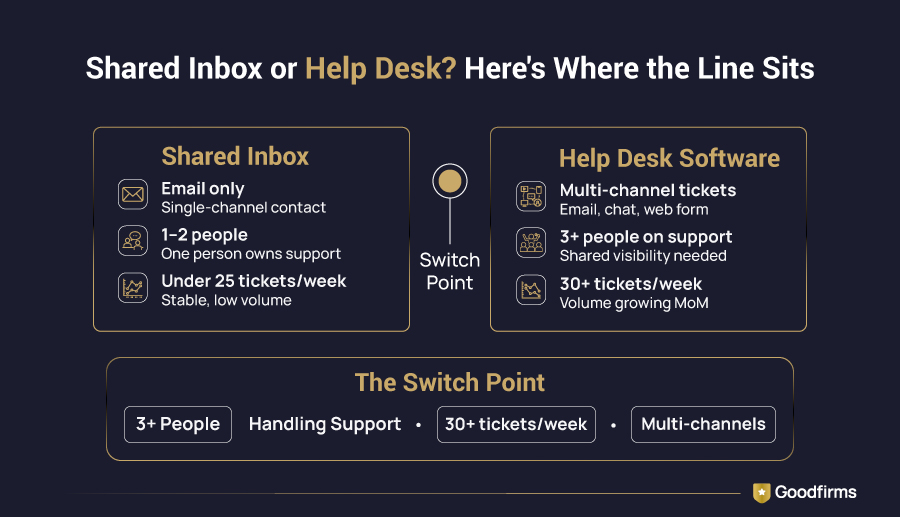
A shared inbox is enough when you have 1–2 people handling support, volume is under 25 queries per week, and all contacts come through one channel.
You need a help desk when 3+ people touch support, volume is growing month over month, customers contact you across multiple channels, or tickets are regularly going unanswered.
If your needs go beyond ticketing, covering feedback, live chat, or full customer service workflows, there's a broader range of customer service software worth exploring, depending on where your team is headed.
How AI Fits Into the Picture for Small Business Help Desks
AI help desk software for small business is the biggest category claim of 2025–2026. Here's the honest split between what works and what's noise.
Where AI Genuinely Helps Small Teams
- AI-suggested replies: Drafts a response based on ticket content. Agents review and send. Real time-saver on repetitive query types
- Auto-tagging and categorization:Reads incoming tickets and tags them (billing, technical, shipping) without manual sorting
- Knowledge base suggestions: Surfaces relevant help articles to customers before they submit a ticket, deflects simple queries before they become tickets
- Ticket summarization: Summarizes long thread histories so agents get full context without reading 20 back-and-forth replies
Where AI Is Overhyped for Small Businesses
- Fully autonomous AI chatbots: Perform poorly without large volumes of historical ticket data; most small teams don't have this yet
- Predictive CSAT scoring: Interesting data, but a 3-person team doesn't need AI to gauge whether a customer is satisfied
- AI workforce management and scheduling:Built for contact centers with 50+ agents and shift-planning complexity
- Voice AI integration: Valuable at call center scale; overkill for small business phone support
|
AI feature |
Worth it for SMBs? |
Why |
|---|---|---|
|
AI reply drafting |
Yes |
Cuts per-ticket time on repetitive queries |
|
Auto-tagging / categorization |
Yes |
Eliminates manual sorting at no cognitive cost |
|
Knowledge base suggestions |
Yes |
Deflects tickets before they're created |
|
Ticket thread summarization |
Yes |
Saves agents from reading 20-reply chains |
|
Autonomous AI chatbot |
Not yet |
Needs data volume that most SMBs don't have |
|
Predictive CSAT scoring |
No |
Interesting data, zero action at small team scale |
|
AI workforce scheduling |
No |
Built for 50+ agent contact centers |
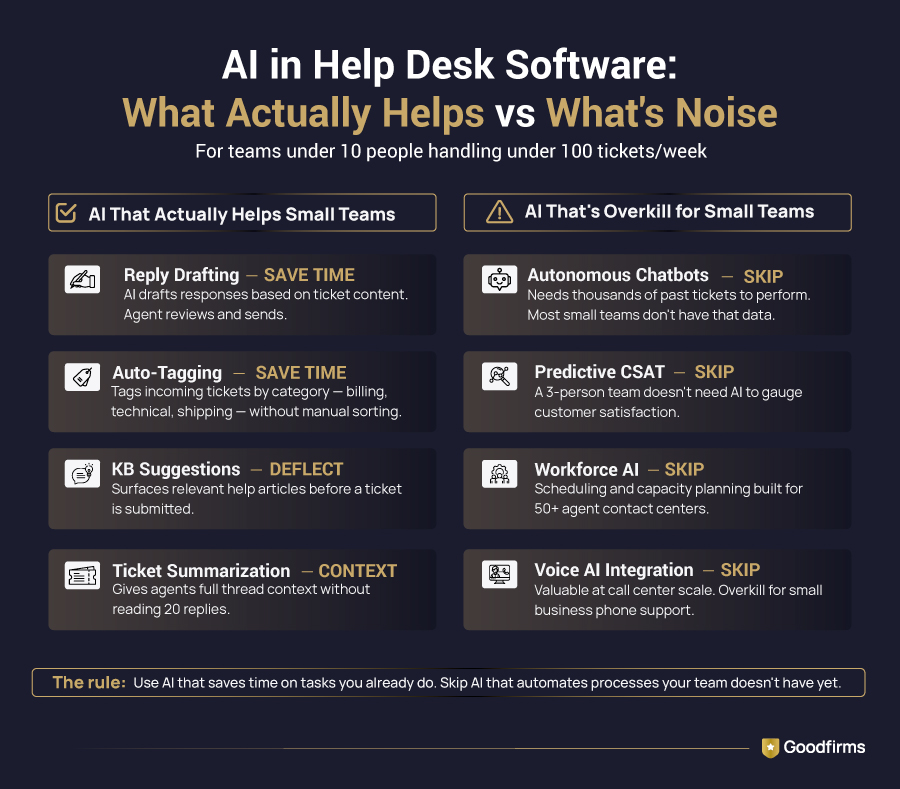
The rule of thumb: Use AI features that save your agents time on tasks they already do. Skip AI features that automate processes your team doesn't have yet. For a deeper look at where AI is headed in ticketing, read Ticketing Software in the AI Era on Goodfirms.
How to Choose the Right Help Desk Software for Your Small Business
Picking the wrong tool is expensive, not just in subscription cost, but in the time lost to a bad setup, a confused team, and a migration you'll eventually have to do anyway. These five steps cut the decision down to what actually matters for a small business.
Step 1: Audit Your Current Support Reality
Answer these before opening a single pricing page:
- How many support queries do we get per week?
- How many people currently handle support?
- What channels do customers use to contact us?
- What's our biggest pain point: speed, organization, or visibility?
Step 2: Define Your Non-Negotiables
List 3–5 features you absolutely must have. This prevents you from being upsold on features you'll never use. Most small teams genuinely need: email ticketing, shared inbox, assignment, canned responses, and basic reporting. That's the core.
Step 3: Set a Realistic Budget
- Under 30 tickets/week: A free plan is likely sufficient (Zoho Desk, HESK, Faveo)
- 30–100 tickets/week: $10–$20/user/month covers everything a small team needs
- 100+ tickets/week with growth: $20–$50/user/month with automation and reporting justifies the spend
Cloud-based help desk software for small business at this price range has matured significantly; you don't need to spend enterprise money for professional-grade support. If you're just getting started, free help desk software from tools like Freshdesk, Zoho Desk, and Help Scout gives you a real working system at zero cost, no trial expiry, and no credit card required.
Step 4: Trial Before You Commit
Every credible tool offers a free trial. Run it with your actual team for two weeks using real tickets. Evaluate: How long did the setup take? Did the team use it naturally? Did it solve the core problem?
Step 5: Check Scalability
Choose a tool with a clear upgrade path, from free to paid, from basic to advanced, without forcing a full platform migration. You don't want to re-evaluate and rebuild your support stack 12 months from now.
Before committing to any tool, comparing options across pricing models, deployment types, and team size is worth the time. The ticketing software landscape has expanded significantly in 2026, and the right fit varies more than most vendor pages will admit.
Conclusion: So, Do You Actually Need It?
Here's the straight answer.
Yes - if your team is growing, queries are increasing, things are getting missed, or more than two people are touching support. At $10–$20/user/month, the right help desk software for small business pays for itself the first time a customer doesn't churn because their issue was handled properly.
Not yet -if you're handling fewer than 25 queries a week with one or two people and your existing inbox is genuinely working. A well-organized Gmail setup is still a legitimate option at this stage.
Never pay for overkill. AI-powered omnichannel platforms with predictive dashboards are built for enterprise teams. A small business needs tickets, assignments, templates, a basic knowledge base, and simple reports. Start there, prove the value, then layer in complexity only when your team and volume demand it.
FAQs
1. What is help desk software used for?
Help desk software is used to manage, track, and resolve customer support requests from a centralized platform. It converts incoming queries into structured tickets, making it easier for teams to assign, prioritize, and close issues without anything getting lost.
2. What is help desk software for small businesses?
For small businesses, it's a lightweight tool that organizes customer queries, helps small teams collaborate on support, reduces response times, and provides a knowledge base, without the complexity or cost of enterprise platforms. The best small business help desk software is simple to set up and fairly priced.
3. Do small businesses need help desk software?
Not always immediately. If you're handling fewer than 25 queries per week with 1–2 people, a shared inbox can work. Once volume grows or more people get involved in support, a help desk pays for itself quickly.
4. Is help desk software worth it for small business?
Yes, when chosen correctly. The key is not paying for enterprise features your team won't use. A free or $10–$20/agent/month plan with core ticketing, assignment, and templates delivers real ROI for most small businesses.
5. What features do I actually need in help desk software?
For most small businesses: email ticketing, shared inbox with collision detection, ticket assignment, canned responses, basic automation rules, a knowledge base, and simple reporting. Everything else is optional.
6. What is the difference between help desk and service desk software?
A help desk handles reactive customer or employee support requests. A service desk is broader, managing IT infrastructure, change requests, and asset management. Most small businesses need a help desk, not a full service desk.