Miro

United States HQFounded 2011

Deployment

Web-basediPhone/iPadAndroidWindowsMacLinux

Best for

SmallMediumLargeFreelancer

Overview

About Miro

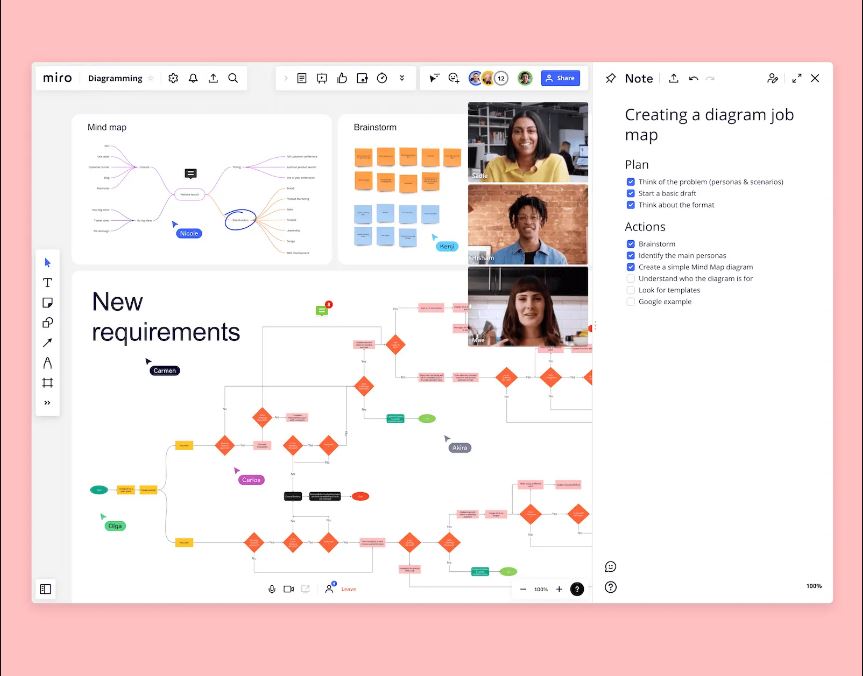
Keep your team's minds in sync with Miro (formerly RealtimeBoard and AWW app). A virtual whiteboard and remote collaboration tool, Miro helps cross-functional teams work more efficiently together to build great things. The platform allows teams to ideate, visualize, and share ideas without any boundaries. It comes with over 50 pre-made templates for capturing and visualizing ideas, collaboration tools such as comments, chat, screen sharing, and video chat, and integrations with popular business tools.

At a glance

Software information

Industries served, licensing and the support Miro provides.

Industries

  • Design
  • Marketing-advertising
  • Mechanical-or-industrial-engineering

Licensing

  • Proprietary
  • Monthly Payment
  • Annual Subscription
  • Quote Based

Support

  • Phone
  • 24x7 Support

Training

  • Help Guides
  • Video Guides
  • Blogs
  • Case Studies
  • On-Site Training

Knowledge Base

  • Help Guides
  • Video
  • Blog
  • Case Studies
  • On-Site Training
Languages (10)
ChineseDutchEnglishFrenchItalianJapaneseKoreanPortugueseSpanishTurkish

Review analytics

What customers report

4.5
Based on 10 verified reviews
Ease of use4.5
Features & functionality5.0
Customer support4.5
Value for money4.0
Integrations5.0

What users like the most

  • We use Miro as a brainstorming board. Works just fine for our use case.

What users like the least

  • I can't select a custom color for a note which is unfortunate and would be really nice to have

What users say

Review Analytics of Miro

Every review is verified through Goodfirms before it's published.

4.510 Verified Reviews
Ease of use (2 reviews)4.5
Features & functionality (2 reviews)5.0
Customer support (2 reviews)4.5
Value for money (1 review)4.0
Integrations (1 review)5.0
Review Summary
Summarized from 10 verified reviews · Updated September 2026
Miro is praised for its flexible whiteboard interface that enables quick idea capture and visual collaboration, particularly for remote teams running workshops, retrospectives, and brainstorming sessions. Users appreciate the extensive template library, intuitive drawing capabilities, and ease of use that reduces setup time. Concerns include occasional data loss issues and board locking problems, along with limited interoperability with certain third-party tools like Microsoft applications, which some users note as gaps compared to competitors.
✦ AI-generated summary. May not reflect every review.
Detailed Reviews of Miro
Sort ByWrite a Review

What reviewers mention most

Aleksandr Tynianov, CTO @ Krasty Soft | Solving Business Problems With Software Solutions | Software Developer | Deliver at Krasty SoftVerified Review
Posted on Mar 1, 2024

“Best tool for brainstorming”

Overall rating5.0
Ease of use5.0
Features & functionality5.0
Customer support5.0
We use Miro as a tool for our team brainstorming sessions. It's just perfect for quick and easy systemizing ideas and making a meaningful picture out of them. Easy to use, bug-free, affordable, great UX, perfect for small teams. It's worth spending money on.

Dan Close, Founder and CEO at We Buy Houses in KentuckyVerified Review
Posted on Oct 10, 2022

“Miro is a top visual collaboration tool for teams of any size”

Overall rating5.0
Ease of use4.0
Features & functionality5.0
Customer support4.0
Value for money4.0
Integrations5.0

We We Buy Houses in Kentucky use Miro. Over 25 million users trust Miro, the top visual collaboration tool for teams of any size, globally. Miro is ideal for mapping, diagramming, interactive workshops, team meetings, and brainstorming. Your team may get started collaborating right away with the help of more than 250 pre-made templates. Make Miro your central center for collaboration and one source of truth by utilizing our 80+ effective connectors, including those with Jira, Asana, Monday.com, MS Teams, and Google Workspace.

Leanne MillardVerified Review
Posted on Dec 23, 2021

“A great tool”

Overall rating4.0

Our organisation allows us to access this product for a monthly fee. They provide monthly training. It is such a great collaborative tool particularly with remote workers. I love the widgets they really enhance and coordinate work tasks

James ThorntonVerified Review
Posted on Dec 20, 2021

“THE best tool for Consultants”

Overall rating4.0
I have used MIRO to run workshops ranging from Digital deployment, Organizational Design, Hoshin Kanrin Policy Deployment, Standard Process Mapping, Management Control systems and Retrospectives.

It's easily the most functional and flexible toll to use.

4 star rating due to interoperability with Microsoft suite
Zico Arrieta PerezVerified Review
Posted on Dec 15, 2021

“We recommend this software to everyone”

Overall rating4.0

The interaction of colors makes the tool much easier to use and pleasant to work with in all company processes.

Borna CvrtilaVerified Review
Posted on Dec 15, 2021

“Miro works amazing”

Overall rating4.0

Miro works amazing, however, the fact that you can lose a board and get it locked presented the irrreversible issue.

Gulsah EraslanVerified Review
Posted on Dec 15, 2021

“I love using the online whiteboard tool and using Miro”

Overall rating5.0

Miro comes with a set of pre-built templates that can inspire or serve as a starting point for your own project work and I love it! I love using the online whiteboard tool and using Miro when leading real-time remote design thinking workshops.

Diego GuillenVerified Review
Posted on Dec 1, 2021

“Miro helps us work remotely”

Overall rating5.0
Used for retrospectives and presenting upcoming milestones for the product development team. It helps us to review the work carried out to complete the sprints and reach the milestones. I realized how powerful that can be once you adapt your thinking to it. Miro helped us to move fully remote.
Jay FallahVerified Review
Posted on Dec 1, 2021

“Draw at the speed of thinking”

Overall rating5.0
When I want to capture an idea that I am working on to show others or to remind myself later on, I use Miro. Hundred of templates make it easy not to start with a blank page, a starting point with graphics and descriptions make the job easy and starts to focus my thoughts. From there on the ease of drawing and reflecting thoughts in graphic context is what I draw inspiration from. I can form my opinion as I am drawing while I am thinking and while I am drawing. Nothing else comes close.
Ryan Hyslop, Co-Founder at We Make WavesVerified Review
Posted on Dec 9, 2019

“Happy with what we have”

Overall rating4.0

Pros: Flexible, doesn't give us a fixed structure as every project is usually different

Cons: Having multiple tools for different stages things get lost or have to be copied between

Overall Experience: Managed ok for the past 2 years, don't want to be baked into a specific workflow all the time so happy with what we have

Capabilities

Miro features

The full feature set, grouped by module.

Collaboration Software

  • Agile & Scrum
  • Audio/Video Chats
  • Brainstorming
  • Calendar Management
  • Content Collaboration
  • Document Management
  • Project Management
  • Task Management
  • Version Control
  • Workflow Management

Remote Work Software

  • Audio/Video Calls
  • Collaboration
  • File Sharing
  • Meeting Management
  • Project Management
  • Remote Access
  • Security

Whiteboard Software

  • Collaboration
  • Diagramming
  • Digital Canvas
  • File Sharing
  • Idea Management
  • Presentation Tools
  • Project Planning
  • Sketching & Annotation Tools
  • Templates
  • Visual Workflow Management

Idea Management Software

  • Activity/News Feed
  • Brainstroming
  • Collaboration
  • Crowd Management
  • Idea Evaluation
  • Idea Ranking
  • Reports
  • Rewards & Gamification
  • Workflow Management

Diagram Software

  • Collaboration
  • Data Import/Export
  • Diagram Layouts
  • Drawing Tools
  • Organizational Charting
  • Templates

Scrum Software

  • Collaboration Board
  • Daily Reports
  • KPI Monitoring
  • Prioritization
  • Progress Tracking
  • Roadmapping
  • Task management

Mind Mapping Software

  • Brainstorming
  • Concept Mapping
  • Embedding
  • Flowchart
  • Presentation Tools
  • Project Planning
  • Templates

Plans

Miro pricing

Price Type
Month
Free Version
No
Payment Frequency
Monthly Payment, Annual Subscription, Quote Based

Media

Screenshots & video

This profile is not fully claimed

Do you own or represent Miro? Verify your business email to claim and manage this Goodfirms profile.

Request claim