



Mercury
Deployment
Best for
Overview
About Mercury
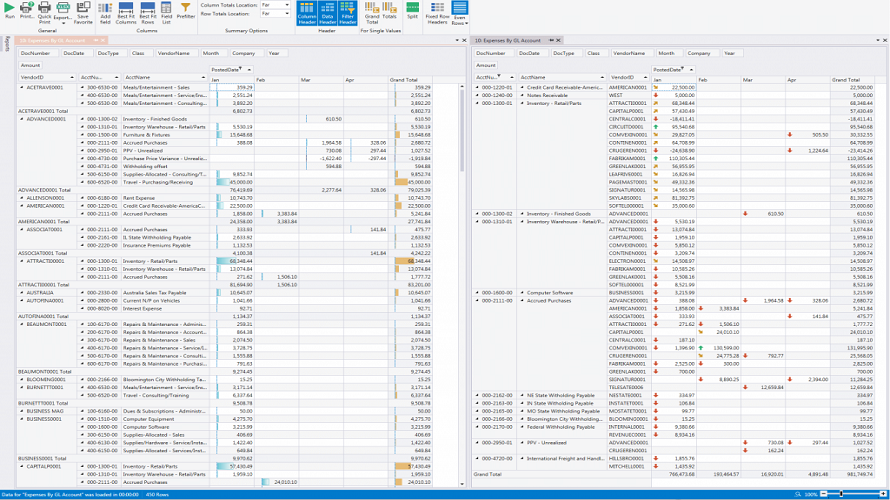
Mercury is a powerful yet easy to use report creation and analysis tool. Many features are available to help you create and deliver meaningful results. Rearrange results by dragging field icons. Easily show more or less detail. Add calculated fields, apply conditional formatting, filter, sort, and more. All this is done in-place by working directly with the report results. Entering report parameters is easy. You can have dynamic single and multi-select lookup lists, and use the same lookup in multiple reports.
Each run is shown in its own result-tab, you can even show them side-by-side or one above another for easy comparison. You can save your analyzed and customized report as a Favorite for subsequent re-use. You can save parameter values too (so you don’t have to enter them again next time), but you can still easily run a Favorite layout with different parameter values. You can keep your Favorite private or share it with colleagues. Each report can have its own set of favourites, as many as you need.
At a glance
Software information
Industries served, licensing and the support Mercury provides.
Licensing
- Monthly Payment
- Annual Subscription
- Free trial
Support
- Online (Ticket)
- Business Hours
Training
- Help Guides
- Video Guides
- Blogs
- Webinars
- Infographics
Knowledge Base
- Help Guides
- Video Guides
- Blogs
- Webinars
- Infographics
Capabilities
Mercury features
The full feature set, grouped by module.
Plans
Mercury pricing
Media
Screenshots & video
This profile is not fully claimed
Do you own or represent Mercury? Verify your business email to claim and manage this Goodfirms profile.