
Luminar Neo

United States HQFounded 2017

Deployment

Web-basedWindowsMac

Overview

About Luminar Neo

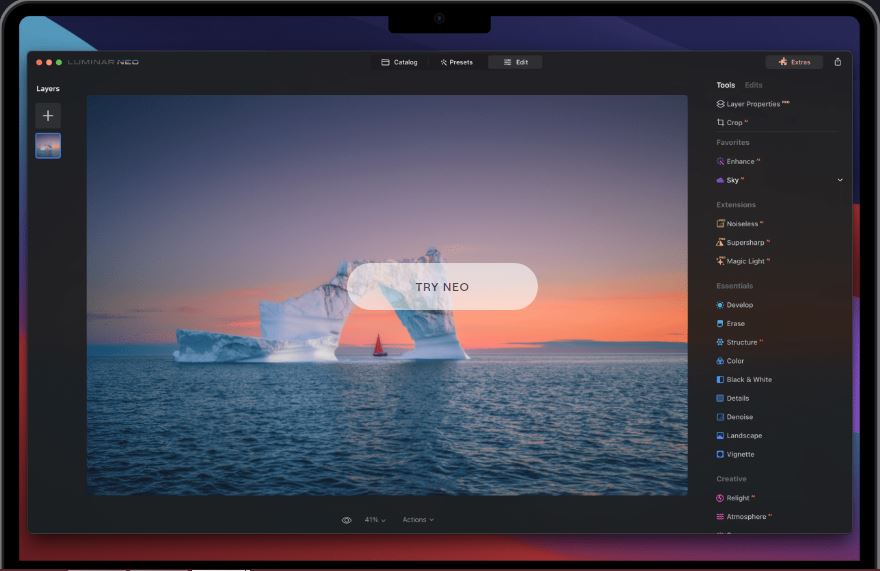
Capture your favorite moments and bring them to life with Luminar Neo — the cutting-edge photo editing software designed to make your creative vision a reality. Luminar is designed to be convenient for people with different proficiency levels. The software’s intuitive AI-powered controls automate complicated multistep tasks.

At a glance

Software information

Industries served, licensing and the support Luminar Neo provides.

Industries

  • Photography

Licensing

  • Proprietary
  • Monthly Payment
  • Annual Subscription
  • Quote Based
  • Free trial

Support

  • Email
  • 24x7 Support

Knowledge Base

  • Help Guide
  • Video
  • Blog
Languages (1)
English

Review analytics

What customers report

5.0
Based on 6 verified reviews
Ease of use5.0
Features & functionality4.8
Customer support5.0

What users like the most

  • Luminar’s AI tools handle the heavy lifting of photo editing. Whether it’s adjusting lighting, sharpening, or enhancing details, it’s all done with minimal effort. I can now spend more time focusing on the creative side of my photos.
  • The AI ​​tools Enhance AI, Magic Light AI, Sky Replacement, AI Masking, and GenSwap allow you to make complex edits in almost one click. AI masking is particularly impressive: it separates objects from the background almost perfectly, and you can quickly adjust the results manually if necessary. Logically arranged panels, clear icons, and user-friendly sliders make it easy even for those with no editing experience.
  • Easy interface, powerful AI tools, realistic results, and no subscription required.

What users like the least

  • Luminar’s AI tools handle the heavy lifting of photo editing. Whether it’s adjusting lighting, sharpening, or enhancing details, it’s all done with minimal effort. I can now spend more time focusing on the creative side of my photos.
  • Some tools require some work: for example, masking objects with fine details (branches, complex edge objects) sometimes requires manual adjustments. Working with large files can be slow, and the basic file organization is inferior to Lightroom.
  • No built-in graphics or text tools

What users say

Review Analytics of Luminar Neo

Every review is verified through Goodfirms before it's published.

5.06 Verified Reviews
Ease of use5.0
Features & functionality4.8
Customer support5.0
Review Summary
Summarized from 6 verified reviews · Updated September 2026
Luminar Neo is praised for its intuitive interface and AI-powered editing tools that significantly speed up photo enhancement tasks like sky replacement, lighting correction, and color grading. Users across skill levels appreciate how the software delivers professional results with minimal learning curve, supporting RAW files and batch processing. While reviewers highlight the strong creative capabilities and time-saving features, some note that very demanding workflows or heavy data processing may require compromises compared to more specialized tools.
✦ AI-generated summary. May not reflect every review.
Detailed Reviews of Luminar Neo
Sort ByWrite a Review

What reviewers mention most

Evgeniya, Photographer at PhotographerVerified Review
Posted on Feb 6, 2026

“A surprisingly powerful and friendly photo editor”

Overall rating5.0
Ease of use5.0
Features & functionality5.0
Customer support5.0
I started using Luminar Neo without watching tutorials — everything just makes sense from the start. The interface is super clear, and AI tools like Enhance AI, Relight AI, Skin AI, and Bokeh AI really help create professional-looking photos in just a few clicks.
The software works great for portraits, landscapes, and even product shots. Batch processing saves tons of time, and I love being able to save my own presets and apply them later. The creative filters (Glow, Dramatic, Mystical) add a nice cinematic touch, and the new Upscale AI tool is a real bonus for enlarging older photos.
Even on my MacBook Air M2, Neo runs smoothly, and exporting is fast.

Lisa K, Content Manager at SPFVerified Review
Posted on Nov 7, 2025

“The most convenient editor in my life”

Overall rating5.0
Ease of use5.0
Features & functionality5.0
Customer support5.0
I started using Luminar Neo before AI became widely used, and I really like how they pick up on new technologies and incorporate them into the program! Now many of Luminar's features are AI-based, and it works quite well. But I like that I can still do everything manually.
Saly ThomsonVerified Review
Posted on Nov 7, 2025

“Solid editing suite with smart AI, and room to grow”

Overall rating5.0
Ease of use5.0
Features & functionality5.0
Customer support5.0
I’ve been working with Luminar Neo for a few years now and it’s become my go-to for fast, creative photo edits. In short, if you want a modern editor that handles the heavy lifting and lets you focus on your creative vision, Luminar Neo is a strong choice. Just keep in mind that for very heavy data or advanced workflow needs, it might require some compromises.
Marharyta MalinovskaVerified Review
Posted on Nov 3, 2025

“Powerful photo editor with smart, easy-to-use tools”

Overall rating5.0
Ease of use5.0
Features & functionality4.0
Customer support5.0
I’ve been using Luminar Neo for about a year, and it’s become my main photo editor. The AI tools save a ton of time. Things like sky replacement, relight, and cleanup work really naturally. I love that I can get a polished look in minutes without needing to dive into complex layers or masks.
hannahVerified Review
Posted on Oct 30, 2025

“A powerful and user-friendly AI editor for photographers of all skill levels.”

Overall rating5.0
Ease of use5.0
Features & functionality5.0
Customer support5.0
The program is ideal for both professional photographers and amateurs who want to enhance their photography skills without needing to learn complex tools. The interface is intuitive, with all functions logically arranged, and their usage is clear from the first launch. Neo also offers powerful editing capabilities thanks to built-in AI: lighting correction, sharpening, detail enhancement, and color correction now take minutes instead of hours. I'm especially pleased that Neo supports RAW files, allowing you to achieve high quality even with complex edits. For me, the program has become a key assistant when traveling, shooting for social media. Quick photo shoots—a series of photos can be processed in literally an hour, and the results look professional.
StevenVerified Review
Posted on Aug 27, 2025

“Great for photographers on a time crunch”

Overall rating5.0
Ease of use5.0
Features & functionality5.0
Customer support5.0
For anyone who wants to save time on photo editing without sacrificing quality, Luminar is an excellent choice. The AI features take care of most of the work, so I can focus on other aspects of my projects.

Capabilities

Luminar Neo features

The full feature set, grouped by module.

Photo Editing Software

  • Collage Maker
  • Contrast Change & Brightening
  • Crop Photo
  • Image Merging
  • Image Slicing
  • Photo Frames
  • Resize Image
  • Sharpness Adjustments
  • Storage

Plans

Luminar Neo pricing

Free Version
No
Payment Frequency
Monthly Payment, Annual Subscription, Quote Based
Preferred Currency
USD ($)
Free Trial
30 Days
Standard$9.65 / month

Media

Screenshots & video

This profile is not fully claimed

Do you own or represent Luminar Neo? Verify your business email to claim and manage this Goodfirms profile.

Request claim