“An apt and go to tool for mobile web testing”

LT Browser
Deployment
Best for
Overview
About LT Browser
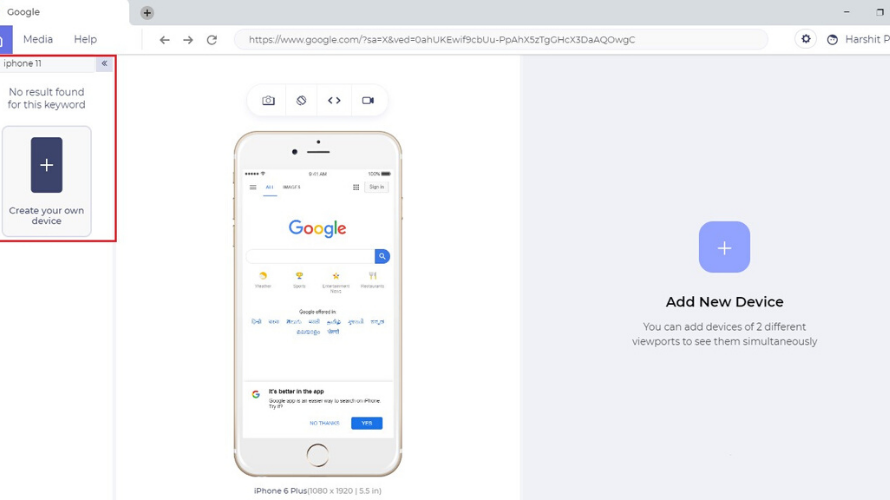
LT Browser is a specialized development tool designed to streamline responsive web design testing. Built by TestMu AI (Formerly LambdaTest), it addresses the friction of modern cross-device debugging by letting developers load a single URL and preview it side-by-side across more than 50 pre-configured mobile, tablet, and desktop viewports.
A core feature is mirrored interactions: any scroll, click, or text input performed in one screen is duplicated instantly across all others in real time. This makes layout inconsistencies instantly noticeable.
LT Browser integrates smoothly with local developer setups by supporting hot reloading, so saved code updates reflect across all viewports immediately. Each device frame features its own dedicated Chromium DevTools window for isolated CSS and JavaScript debugging. Additionally, it offers built-in Lighthouse performance audits and native integrations with tools like Jira, GitHub, and Slack to log and share layout bugs effortlessly.
At a glance
Software information
Industries served, licensing and the support LT Browser provides.
Industries
- Information-technology-services
Licensing
- Open Source
- Monthly Payment
- Annual Subscription
- Free
- Free trial
- Free version
Support
- Live Chat
- Phone
- 24x7 Support
Training
- Help Guides
- Blogs
- On-Site Training
Knowledge Base
- Help Guides
- Blogs
- On-Site Training
Review analytics
What customers report
What users say
Review Analytics of LT Browser
Every review is verified through Goodfirms before it's published.
What reviewers mention most
“Makes mobile application development easy and is as promising as it claims to be.”
“LT Browser is a powerful and intuitive browser automation tool that makes it easy to test web applications and websites”
My company is using LT Browser for a long now and it supports both Windows and MacOS, and it's very easy to use - even for those who are new to automated testing. LT Browser is one of the most popular automated testing tools on the market, and it has been used by some of the largest companies in the world. It's been praised for its ease of use, power, and flexibility, and it's a great choice for anyone looking for an all-in-one automated testing solution.
“best responsive website testing tool in the market you could go for”
“LT Browser - A Tool For Testing Faster & Precise Responsive Web Apps”
“Easy testing across latest Apple, Samsung and OnePlus smartphones.”
Screen Touch mode is a handy feature to analyze the touch behavior. It imitates the real device without any hiccups
It’s ability to local host testing, hot reloading and debugging tools combined helps a lot with productivity. Even our designer teammates use it to visualize the webpage. They verify the resolution criterias of design documents using LT Browser. Really helpful tool for web designers and developers.
“Our go to mobile testing tool”
“Helped us develop mobile websites faster!”
“Saves huge amount of time across designs/devs”
“Must have tool for web designers & developers”
Our development team relies heavily over this tool since it offers hassle-free local testing experience, supports hot-reloading and offers developer tools to help us debug any UI bug on the go.
Even our design team loves the LT browser due to its intuitiveness. They are always intrigued to check if the changes are rendering well and as per the design or not after every release cycle. With LT browser, they can do it easily without having to install anything or dealing with developer tools mobile-view debugging.
Capabilities
LT Browser features
The full feature set, grouped by module.
Plans
LT Browser pricing
Media
Screenshots & video