



DocSpring
Deployment
Best for
Overview
About DocSpring
DocSpring makes it easy for developers to fill out PDF forms. We provide a visual PDF template editor and PDF filling API.
• Upload a PDF template: We’ll automatically import fields if your PDF has a fillable form.
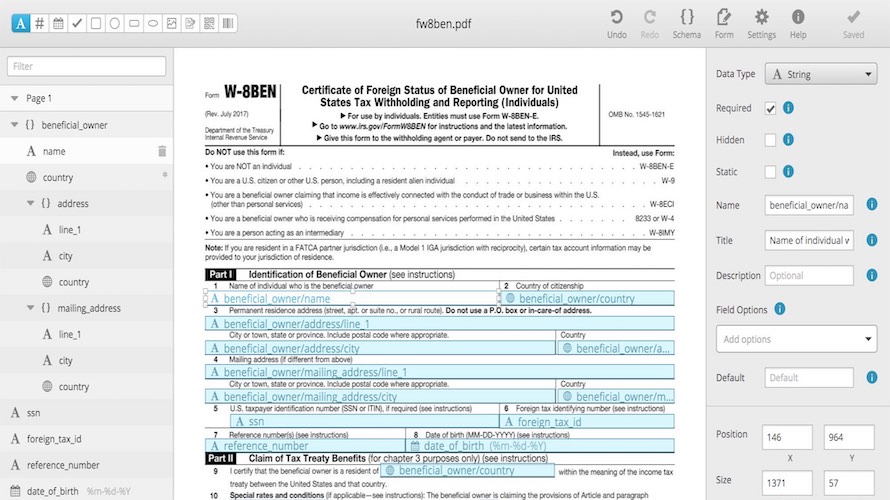
• Set up your fields: Use our visual template editor to drag-and-drop your fields.
• Send an API request: Send a POST request to generate a PDF with a few lines of code. Drag-and-drop your fields in DocSpring's visual PDF template editor, then set your fields types, conditions, and how you want to display the data.
Ensure the data you send in your API requests matches the fields in your PDF templates. Never accidentally delete a field or send the wrong data. We support a wide range of field types, so you can fill out and sign any type of form. Fields include barcode, QR code, image, signature, and many more. We can generate web-based forms from the fields in your PDF template. Use these forms to test your PDF template, or embed them on your own website.
At a glance
Software information
Industries served, licensing and the support DocSpring provides.
Licensing
- Monthly Payment
- Quote Based
- Free
- Free trial
- Free version
Support
- Phone
- Live Chat
Training
- Help Guides
- On-Site Training
Knowledge Base
- Help Guides
- On-Site Training
Capabilities
DocSpring features
The full feature set, grouped by module.
Plans
DocSpring pricing
Media
Screenshots & video
This profile is not fully claimed
Do you own or represent DocSpring? Verify your business email to claim and manage this Goodfirms profile.