Key takeaways
- Plan the implementation around clear business goals.
- Fix existing processes before automating them.
- Prepare data and CMDB early.
- Test workflows and integrations with real users.
- Roll out ServiceNow in phases when needed.
- Keep measuring and improving after go-live.
A ServiceNow implementation can look pretty straightforward on a project plan. Define the requirements, configure the platform, test it, and go live.
The reality is usually less tidy.
Teams may start configuring workflows before agreeing on how those workflows should work. Data may need more cleaning than expected. An integration that looked simple during planning may turn into a project of its own. And then there are users who need to change the way they work.
This is where a ServiceNow implementation roadmap helps. It gives the project a clear order, starting with what the business wants to achieve and ending with what happens after go-live.
A good implementation partner can help you plan the rollout, configure ServiceNow, handle integrations and data migration, and support the platform after go-live. Explore Goodfirms' list of verified ServiceNow consulting companies to compare providers based on reviews, services, location, and more.
What is Included in the ServiceNow Implementation Roadmap?
The roadmap is the plan that lays out how an organization will introduce ServiceNow, from the initial planning stage to post-launch improvements.
It covers everything, including accounts for business processes, users, data, integrations, governance, testing, and adoption.
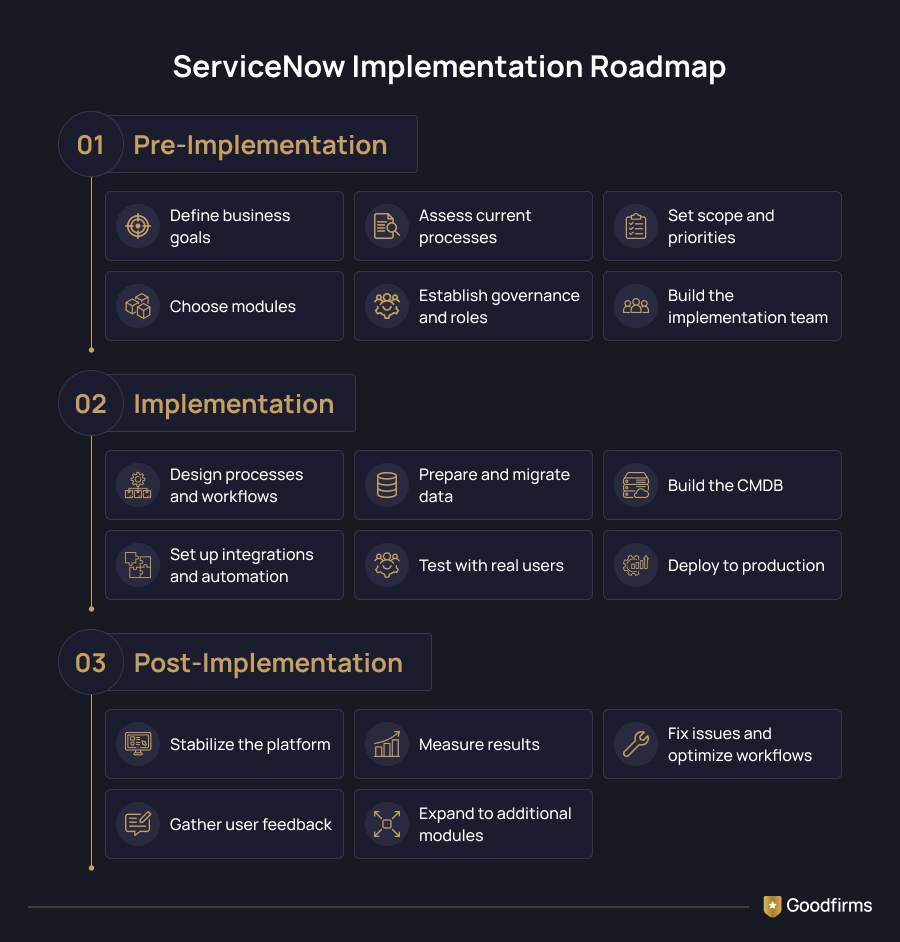
Most ServiceNow implementations can be viewed in three stages:
- Pre-implementation: Define goals, scope, processes, responsibilities, and priorities.
- Implementation: Design processes, configure ServiceNow, prepare data, set up integrations, test the platform, and deploy it.
- Post-implementation: Stabilize the platform, measure results, fix what isn't working, and plan the next phase.
You don't have to implement every ServiceNow capability in one go. ServiceNow's implementation guidance recommends planning phases around business value, dependencies, organizational readiness, and lessons learned during earlier phases.
Pre-Implementation Planning
This is where you decide what you are trying to solve, what belongs in the first phase, and who will own the platform once the implementation team is gone.
a. Define Your ServiceNow Implementation Goals
Start with the problem, not the platform.
Maybe your IT team spends too much time handling requests manually. Maybe incident resolution takes too long. Or employees have to jump between several systems to get a simple request completed.
Write those problems down.
Then decide what improvement you expect from ServiceNow. You might want to reduce incident resolution time, improve self-service adoption, increase SLA compliance, or cut down on manual work.
These goals will also give you something to measure later. Otherwise, the project can easily turn into a simple question of whether the platform went live on time.
b. Assess Current Processes and Identify Gaps
Before changing a process, see how it actually works today.
Talk to the people who use it. Map the steps. Look for:
- Manual approvals
- Repeated data entry
- Unnecessary handoffs
- Duplicate tools
- Process bottlenecks
- Different teams handling the same request differently
- Workarounds employees have created over time
This is also where you may find a process that shouldn't be automated as-is.
If a request passes through five teams because nobody knows who owns it, putting those five steps into ServiceNow won't solve the problem. You'll just have an automated version of the same mess.
Fix the process first. Then automate it.
c. Define Scope, Modules, and Priorities
ServiceNow covers a lot of ground. ITSM, ITOM, CSM, HRSD, SecOps, SPM, and other capabilities can all become part of the platform.
That doesn't mean they all need to be part of phase one.
Decide:
- Which modules are in scope
- Which teams will use them
- Which workflows need attention first
- Which systems need to connect with ServiceNow
- What data needs to be migrated
- What can wait for a later phase
A focused first release can make the project easier to manage. It also gives the team a chance to learn from real usage before expanding the platform.
d. Establish Governance and Roles
Someone has to own ServiceNow after implementation.
Decide who handles:
- Platform administration
- Architecture decisions
- Process ownership
- Data quality
- Integrations
- Security and access
- Change approvals
- Release management
For larger implementations, a dedicated ServiceNow governance team or Center of Excellence may also make sense.
The exact structure will vary. The important part is that ownership isn't left vague.
e. Build the Implementation Team
ServiceNow implementation isn't just an IT project.
Depending on the scope, you may need:
- ServiceNow administrators
- Developers
- Solution architects
- Business analysts
- Process owners
- Data specialists
- Integration specialists
- QA and testing teams
- Change management and training specialists
ServiceNow Implementation Roadmap
Once the planning is done, the actual implementation can begin.
Instead of treating it as one giant build, break the work into four areas: process and workflow design, data and CMDB, integrations and automation, and testing and deployment.
1. Process Design and Workflow Configuration
Map the future-state workflow and decide:
- What starts the process
- Who handles each step
- Which approvals are needed
- What happens when something goes wrong
- Where automation makes sense
- What the SLA should be
- What the final outcome should look like
For an ITSM implementation, this could include incident, problem, change, request, and knowledge management workflows.
Once the process is agreed upon, configure it in ServiceNow.
This is also where the configuration-versus-customization decision comes in. If ServiceNow already supports a requirement, use the existing capability where it makes sense. Custom development can add maintenance work and make future changes harder.
The goal is to overcome challenges faced in the old system and make the process work better.
2. Data and CMDB Foundation
Data is one of those areas that can look simple in a project plan and become anything but simple once the work starts.
Before moving data into ServiceNow, find out:
- Where the data currently lives
- Who owns it
- Which records are still relevant
- Where duplicates exist
- What needs to be cleaned
- How source fields map to ServiceNow
- Which relationships need to be preserved
The CMDB needs extra attention because several ServiceNow capabilities depend on reliable configuration data.
A CMDB becomes useful when records are accurate, current, and connected in a way that reflects the environment.
ServiceNow recommends taking a structured approach to CMDB design rather than trying to build everything at once.
The same thinking applies to other data migrations. Moving bad data into a new system doesn't make the data better.
3. Integration and Workflow Automation
ServiceNow will need to exchange data with your CRM, ERP, HR system, identity platform, monitoring tools, security products, or collaboration software.
Before building an integration, answer four basic questions:
What data needs to move?
Which system owns that data?
When should it move?
What happens if the integration fails?
For example, an HR system could trigger an employee onboarding workflow in ServiceNow. A monitoring tool could create an incident when a particular event occurs.
These connections can remove manual work, but they also create dependencies. A failure in one system can affect a workflow somewhere else.
Document the integrations early. Then test them with realistic scenarios rather than checking only whether the connection works.
4. Testing and Controlled Deployment
The exact testing plan will depend on the project, but it can include:
Functional testing: Does each feature and workflow work as expected?
Integration testing: Does ServiceNow exchange data correctly with connected systems?
User acceptance testing: Can actual users complete their day-to-day tasks?
Regression testing: Did a new change break something that was already working?
Performance and security testing may also be required for larger or more complex implementations.
Once testing is complete, prepare for production deployment.
That means checking:
- Data migration
- Integrations
- User access
- Training
- User communication
- Support coverage
- Issue escalation
- Recovery procedures
A large implementation doesn't necessarily have to go live everywhere on the same day. A phased rollout can give teams time to learn from the first release before moving to the next one. ServiceNow's guidance also supports phased or iterative rollout planning based on business value, dependencies, and organizational readiness.
Post-Implementation ServiceNow Roadmap
Once real users start working on the platform, you will see things that didn't show up during testing.
The post-implementation stage is where you deal with those issues and decide what comes next.
i. Stabilize the Platform After Go-Live
The first few weeks deserve close attention.
Monitor:
- Workflow failures
- Integration errors
- Data problems
- User access issues
- Performance issues
- Unexpected process behavior
- Support requests
Many teams use a period of hypercare after launch to handle high-priority issues quickly.
Not every user complaint needs an immediate configuration change, though. Keep changes going through the same review and testing process used during implementation.
ii. Measure Implementation Results
Now go back to the goals you defined at the beginning.
Did incident resolution time improve?
Are more employees using self-service?
Are SLAs being met more consistently?
Has manual work gone down?
Are people actually using the new workflows?
The exact metrics depend on what you're implementing. The point is to compare the results with the baseline you established before the project started.
A go-live date tells you that the system was launched. It doesn't tell you whether it solved the problem you started with.
iii. Optimize Workflows and Automation
Real usage will show you where the platform needs work.
Maybe an approval isn't necessary. Maybe users keep skipping a form field. Perhaps a manual task can now be automated.
Look at the data, but also talk to users.
The implementation team may think a workflow is finished. The person using it 30 times a day may have a different opinion.
Use that feedback to decide what needs to change.
iv. Expand ServiceNow Capabilities
Once the initial implementation is stable, you can decide what to add next.
An organization may start with ITSM and later introduce ITOM, HRSD, CSM, SecOps, or other capabilities.
There's no need to expand simply because another module is available.
Each new capability should have a business reason, an owner, a defined scope, and a way to measure its success.
Common ServiceNow Implementation Challenges
A good roadmap won't eliminate every problem; however, it can help you see the common ones coming.
- Unclear Goals and Scope: If stakeholders have different ideas about what ServiceNow should deliver, the project can quickly become difficult to manage.
- Poor Data Quality: Incomplete, outdated, or duplicate data can cause problems with workflows, reporting, integrations, and the CMDB.
- Too Much Customization: The problem starts when teams customize the platform simply because that's how the old system worked.
- Integration Problems: A failure in one connected system can interrupt a ServiceNow workflow or create inconsistent records.
- Scope Creep: New requirements are bound to appear once people see the platform in action.
- Low User Adoption: A new platform doesn't automatically change people's habits. Users need to understand what is changing, why the change is happening, and what they need to do differently.
- Weak Governance: Without clear governance, teams can create overlapping workflows, inconsistent configurations, and access issues.
ServiceNow Implementation Best Practices
A few practical habits can keep a ServiceNow implementation on track.
Start With the Business Problem
Don't start with a module. Start with the problem you are trying to solve.
Roll Out in Phases
A phased rollout keeps the amount of change manageable and gives the team a chance to learn from each release.
Fix Processes Before Automating Them
Automation won't fix a process that doesn't make sense. Clean up unnecessary steps first.
Start Data Work Early
Data migration and CMDB work can affect other parts of the project. Don't leave them until the last few weeks.
Avoid Unnecessary Customization
Use standard ServiceNow capabilities when they meet the requirement. Customize when there's a good business reason.
Involve Users Early
Bring actual users into requirements discussions, process design, UAT, and training.
They will notice things the project team won't.
Measure What Changed
Define the KPIs before implementation. Check them after go-live. If the numbers haven't moved, the project may need another round of work.
Quick ServiceNow Implementation Readiness Checklist
Use this before configuration begins.
- Goals: Have we defined the business problems and the metrics we want to improve?
- Scope: Do we know which modules, teams, and workflows belong in the first release?
- Processes: Have process owners agreed on how the workflows should work?
- Ownership: Are platform, data, integration, security, and approval responsibilities assigned?
- Data: Have we identified what needs migrating, who owns it, and what needs cleaning?
- CMDB: Do we know which configuration items and relationships the first release actually needs?
- Integrations: Have we listed connected systems, data owners, dependencies, and failure scenarios?
- Users: Are real users available for design reviews, testing, and training?
- Launch: Have we agreed on acceptance criteria, support coverage, and a recovery plan?
Your project team should be able to name an owner and show an agreed answer for all of the above items in the first release.
FAQs - ServiceNow Implementation
What are the phases of ServiceNow implementation?
A ServiceNow implementation can be divided into three broad phases: pre-implementation, implementation, and post-implementation. The first phase covers goals, scope, processes, governance, and priorities. The implementation phase covers configuration, data, CMDB, integrations, testing, and deployment. After go-live, teams focus on stabilization, measurement, optimization, and future expansion.
How long does a ServiceNow implementation take?
There isn't a single timeline for every ServiceNow implementation. The duration depends on the number of modules, users, workflows, integrations, data migration requirements, customization, testing, and rollout strategy. A focused implementation will usually have a very different timeline from a large enterprise rollout.
What should a ServiceNow implementation plan include?
A ServiceNow implementation plan should cover business goals, scope, stakeholders, resources, processes, architecture, data migration, integrations, testing, training, deployment, risks, and success metrics. It should also identify dependencies so the team knows which parts of the project need to happen first.
What are the biggest ServiceNow implementation challenges?
ServiceNow implementation common challenges include unclear requirements, poor data quality, excessive customization, integration issues, scope changes, weak governance, and low user adoption. Most of these can be addressed more easily when they're considered during planning instead of after go-live.
Should ServiceNow be implemented in phases?
A phased approach can make a large implementation easier to manage. It lets teams introduce a smaller set of capabilities, see how users respond, and apply what they learn to later phases. ServiceNow's implementation guidance supports phased or iterative rollouts based on business value, dependencies, and organizational readiness.
What is the role of a ServiceNow implementation partner?
A ServiceNow implementation partner can help with requirements gathering, process design, configuration, integrations, data migration, testing, deployment, training, and post-go-live support. The level of external help depends on the organization's internal ServiceNow skills, project size, technical requirements, and available resources.
Ready for ServiceNow Implementation?
A ServiceNow implementation roadmap isn't just a project schedule. It helps the team decide what needs to happen first, what can wait, and how each part of the implementation connects to the business goal.
Start by understanding the problem. Then sort out the processes, scope, data, and ownership before getting into configuration. Once the platform is built, test it with real users and don't treat go-live as the end of the project.
The work continues after launch.
That's when you can see what's actually working, what users are struggling with, and where ServiceNow can do more.