Key takeaways
- The on-demand transportation market reached $251 billion in 2025 and is projected to reach $948.61 billion by 2033.
- A successful on-demand app is one that performs even when real customers, providers, and demand spikes all show up at once.
- Every on-demand platform runs on the same three-part backbone - customer, provider, and admin; regardless of the services it provides.
- The cost of building an on-demand app typically ranges from $15,000 for a single-city MVP to $150,000+ for an enterprise-grade, multi-region platform.
- A soft launch in one city or category, tracked closely for four to six weeks, catches the failures that simulators and projections never do.
Behind the success of every on-demand service, there is a mobile app development company that thinks beyond its UI.
An on-demand app can look quite simple: a customer taps a button to order food, a restaurant accepts the order, and the food is delivered.
It is quite common these days, and nothing to be so impressed about it, right?
But, wait. To make an on-demand app work without any glitches is not as simple as it seems.
The difficult part starts behind that button. The on-demand app that has been used to order food has to match with the right restaurant, calculate availability, process payments, manage cancellations (if any), protect user data, and keep the customers’ experience smooth even when demand suddenly spikes.
Most on-demand apps don't fail because the UI is ugly — they fail because nobody stress-tested the matching logic before launch.
Are you looking for an experienced team to build your own on-demand mobile app? Compare on-demand app development companies vetted by Goodfirms and find the right one compatible with your project requirements and budget.
This guide walks through what on-demand app development actually involves, from real cost ranges to tech stack decisions and mistakes that can cause even well-funded platforms to fail.
What is an On-Demand App?
An on-demand app is used by people who need a cab service, order a meal, buy groceries, or get an electrical/plumbing fix, salon service, and more. It connects customers with providers who can fulfill these on-demand services instantly, like within a few minutes or just a couple of hours. On-demand app development is the process of building that connective system: a customer-facing app, a provider or service app, and an admin panel that manages matching, payments, and disputes behind the scenes.
Once that structure clicks, the rest is really just picking the type of service you are offering through your on-demand app - rides, food, repairs, and more. Below are the different types of on-demand apps based on the services offered.
What Are the Different Types of On-Demand Apps?
Here are the different types of on-demand apps with examples.
- Transportation & mobility: Uber, Lyft, Ola, Bolt
- Food & grocery delivery: DoorDash, Zomato, Instacart, Swiggy
- Home, Self-care & local services: Urban Company, Handy, Thumbtack, TaskRabbit
- Healthcare: Practo, Teladoc, Doctor on Demand
- Logistics & courier: Postmates, Dunzo, Deliveroo
- Niche & vertical-specific: Pet Care, Senior Care, Equipment Rental, Tutoring
Each category depends on real-time location tracking, automated matching algorithms, and in-app payments — the three technical pillars that separate an on-demand platform from a standard eCommerce or content app.
On-demand apps work on convenience psychology. Uber co-founder Travis Kalanick described the appeal of the category directly in a conversation, which was published by Fortune:

Give me what I want, give it to me right now” is the instinct on-demand platforms are built to satisfy.
That same instinct is why the market isn't slowing down anytime soon.
Why Is On-Demand App Development Booming in 2026?
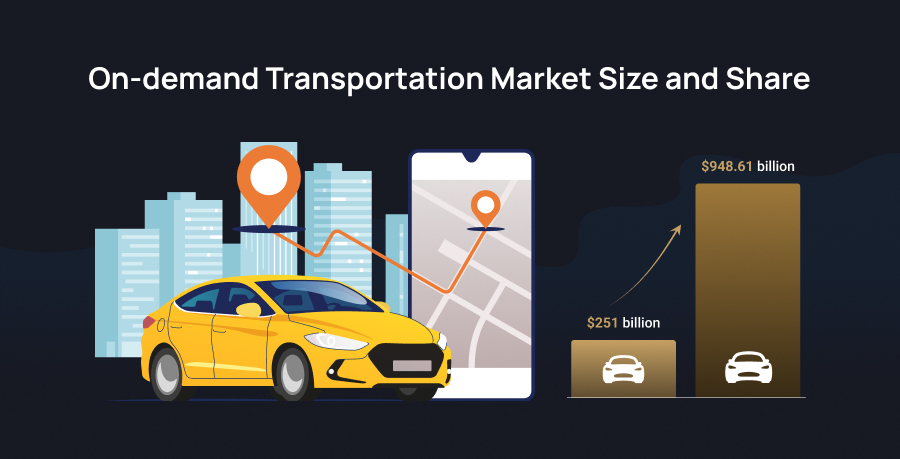
As per IMARC Group’s market research, the on-demand transportation market reached $251 billion in 2025 and is projected to reach $948.61 billion by 2033.
Several factors are driving that growth.
-
Smartphone penetration has made instant booking the default expectation rather than a convenience.
-
Real-time GPS, cloud infrastructure, and mobile payments have gotten cheap enough for a small team to launch a working MVP.
-
Habits formed around grocery, healthcare, and home-service delivery never fully reverted to in-person booking.
-
Niche verticals such as pet care, senior care, tutoring, and equipment rental are proving that an on-demand model does not need Uber-sized scale to turn a profit.
That growth is real, but it doesn't answer the question every on-demand service provider asks next: what will this actually cost?
How Much Does It Cost to Build an On-Demand App?
As per Goodfirms’ research - How Much Does It Cost to Develop an App in 2026?, on-demand app development typically costs between $15,000 and $150,000+. This cost can vary depending on its complexity.
|
Complexity |
Estimated Cost |
|
Single-platform MVP (one service category, one city) |
$15,000 and $40,000 |
|
Multi-platform app (iOS + Android + admin panel) |
$40,000 to $100,000 |
|
Enterprise-grade platform (multi-service, multi-region) |
$150,000+ |
Besides complexity, the cost of building an on-demand app depends on several decisions relating to platforms, features, tech stack, geographical location, and the experience level of mobile app developers you hire.
Every dollar in that range goes somewhere specific. The features below are where most of the budget is spent.
Must-Have Features of an On-Demand App in 2026
Every on-demand platform is an integrated system of three different modules: the customer module, the provider module, and the admin panel holding both together.
Customer Module: Features Used by Customers
Customers rely on features that let them browse categories, compare vendors, and act on a deal without friction. A minimum viable version still needs to cover the basics well:
- Registration: phone number, email, name, and password cover the essentials for a first-time user. Social login through Google, Facebook, or Twitter removes a step and tends to lift signup completion.
- Notifications: order updates, payment confirmations, and delivery status need to reach the customer instantly, not just live inside the app waiting to be checked. This is also what keeps the app visible on a home screen instead of being forgotten after one use.
- Geolocation: real-time order tracking depends on it, built using the Core Location framework on iOS and the Google Location APIs on Android.
- Help and support: a fast path to resolution protects the one thing hardest to win back after a bad order — trust in the brand.
- Feedback: ratings and reviews give both the company and the provider a working signal on where the experience is falling short.
- Payment: wallets, credit and debit cards, and cash on delivery cover the range most customers expect, and each needs to feel equally secure.
Service Provider Module: Features Used by Service Provider
The provider side runs on a different set of priorities than the customer side, built around getting jobs done rather than browsing:
- Registration: providers complete a profile with business or service details, giving customers enough context to choose with confidence.
- Earnings: every payout needs to be tracked and visible, so providers can see revenue accumulate rather than wonder if a payment went through.
- Push notifications: the moment an order comes in, the provider needs to know — a delayed alert is a lost job.
- Accept and reject: a provider who's already at capacity needs the option to decline an order rather than take on more than they can deliver.
- Online and offline toggle: providers step away too, and a simple switch keeps the system from routing jobs to someone who isn't available.
Admin Panel: Features Used by Customers and Service Providers Both
The admin side rarely gets attention in early planning, but it's what keeps the other two apps functioning as the platform grows:
- Dashboard: a single view for tracking customers and providers, built for overseeing, tracking, and detecting issues before they arise.
- Service provider management: performance, ratings, and rates all need to stay visible, along with the ability to offer bonuses that keep reliable and genuine providers engaged.
- Customer management: discounts, cancellations, order history, and rewards need to be accessible from one place so support issues get resolved quickly rather than escalated.
- Reporting: analytics on repeat orders, cancellations, and acceptance rates turn raw activity into decisions worth acting on.
- Charges: admins need control over commission rates and pricing, including the ability to adjust rates when demand spikes.
Goodfirms’ Insight: When deciding which features to include in your on-demand app, consider 2026 app development trends to ensure the app doesn’t become obsolete quickly.
These features, built in the right order, can make an on-demand service successful. Let’s have a look at the step-by-step process to build an on-demand app.
The Step-by-Step Process to Build an On-Demand App
Step 1: Define the service category and target audience
A regional grocery app and a national ride-hailing app need different architecture decisions from day one, especially around geofencing and multi-vendor support.
Step 2: Choose a monetization model
Commission per transaction, subscription, delivery fees, or a hybrid each shapes backend billing logic differently, so this decision needs to happen before development starts. Below are the most popular monetization models to choose from these days.
|
Monetization Models |
Description |
|
Commission-Based |
A percentage cut of every transaction, the model Uber and DoorDash both run on. |
|
Subscription |
A flat recurring fee for unlimited or discounted access, common on grocery and meal-kit platforms. |
|
Delivery or service fee |
A flat charge per transaction, separate from the provider's earnings. |
|
Freemium with paid upgrades |
Free basic booking with paid priority matching or premium support. |
|
Hybrid |
Combining two or more of the above as the platform scales, which is where most mature on-demand apps eventually land. |
Step 3: Map the core user flows
Booking, matching, tracking, payment, and rating were sketched out for all three apps before any design work began.
Step 4: Design the UI/UX
Three interfaces, three different priorities: the customer app optimizes for speed, the provider app for clarity under pressure, and the admin panel for oversight.
Step 5: Select The Tech Stack
Covered in detail below, but this is the most critical decision of all, which needs to be taken care of before the development process starts.
Which Tech Stack Works Best for On-Demand Apps?
No single stack fits every on-demand app, but a few combinations show up repeatedly across successful platforms.
-
Front-end: React Native or Flutter for cross-platform speed; Swift and Kotlin for native performance when the budget allows separate builds.
-
Back-end: Node.js or Django for API and business logic, paired with WebSockets or Socket.io for real-time updates.
-
Database: PostgreSQL for relational data such as users, orders, and transactions, with Redis for caching live location and session data.
-
Cloud infrastructure: AWS or Google Cloud for auto-scaling servers that absorb demand spikes without manual intervention.
-
Maps and location: Google Maps Platform or Mapbox for geolocation, routing, and geofencing.
-
Payments: Stripe, Razorpay, or Braintree, chosen based on the target market's dominant payment methods.
-
Notifications: Firebase Cloud Messaging for notifications and push alerts
Step 6: Build the MVP
Building an MVP with essential features like core booking, matching, and payment flow comes first, since these are the features that prove whether the model actually works. Advanced features like loyalty programs and advanced analytics can wait until real users validate demand for the core service.
Step 7: Test Under Real Conditions
Simulators do not catch what breaks when 500 people request a ride at the same moment a concert lets out. Real load testing, run against actual traffic patterns, is what surfaces the failures a clean test environment never will.
Step 8: Launch and Iterate.
Soft-launch in one city or service category first, then track booking completion, matching time, and cancellation rates for four to six weeks before expanding. A single well-served market surfaces problems like delayed matching during rush hours, a failing payment method, a tedious onboarding flow, and more.
Following this systematic process can ensure a smooth launch of your on-demand app. But make sure that you also pay attention to mistakes to avoid throughout the process to guarantee the success of your on-demand business.
Mistakes to Avoid When Launching an On-Demand App
-
Skipping load testing until after launch, then watching the app crash during the first real traffic spike.
-
Weak provider onboarding and verification, which erodes customer trust faster than any UI flaw.
-
Ignoring geofencing and localization needs for markets outside the first launch city.
-
No structured dispute-resolution flow, leaving support teams to handle refunds and complaints manually.
-
Underestimating customer acquisition cost against a monetization model that cannot sustain it.
-
Every mistake on that list is easier to avoid with an experienced team in place. The question is how to actually find one.
How Do You Choose the Right On-Demand App Development Company?
Look for a team with verified experience in real-time architecture, not just a generic app development portfolio. A few things worth checking before signing a contract:
- Real-time build experience: Has the team actually built matching algorithms and live tracking before, or only static, catalog-style apps?
- Post-launch support: Is there a clear plan for bug fixes, server scaling, and updates once the app is live, or does support end at handoff?
- Comparable project history: Can they show a platform built at a similar scale, in a similar category, not just a portfolio of unrelated work?
- Verified reviews: Goodfirms has a vetted list of on-demand app development companies with verified reviews you can rely on.
Once the bigger decisions regarding cost, features, and the team are settled, a few smaller questions tend to come up right after, and they're worth answering before moving forward.
FAQs: On-Demand App Development
Below are the answers to some questions about on-demand app development.
How long does it take to build an on-demand app?
A single-platform MVP with core booking, matching, and payment features typically takes 3 to 4 months from planning to launch. A multi-platform build with real-time tracking, an admin panel, and both iOS and Android apps usually takes 5 to 7 months. Timelines extend further when the app needs multi-language support, regional compliance, or integration with third-party logistics and payment providers.
Should you build a custom on-demand app or use a white-label solution?
White-label platforms get a service live faster and cost less upfront, which works well for testing demand in a single city before committing to a full build. Custom development costs more and takes longer, but it removes the licensing fees, feature limits, and shared-codebase risks that come with white-label products. Most platforms that scale past their first year eventually move to a custom build.
How do you validate an on-demand app idea before building it?
Run the service manually first, using WhatsApp groups, phone bookings, or a simple booking form, before writing a single line of app code. If customers book consistently and providers can fulfill those requests reliably in one small area, that demand density is a stronger signal than any survey. Building the full platform only after that loop works reduces the risk of investing in a marketplace nobody actually needs.
What does an on-demand app cost to maintain after launch?
Post-launch maintenance typically runs 15% to 20% of the original development cost per year, covering server scaling, bug fixes, OS updates, and third-party API changes. Costs climb further with each new city, service category, or payment method added, since each expansion usually touches the matching logic, geofencing rules, and admin reporting at the same time.
How do on-demand apps protect customer and provider data?
End-to-end encryption for payment and location data, tokenized card storage through the payment gateway, and role-based access controls on the admin panel form the baseline. Compliance requirements add another layer: GDPR for European users, and industry-specific rules such as HIPAA for healthcare on-demand apps, shape how long data can be stored and who inside the company can access it.
Building an On-Demand App That Triumphs Beyond Launch
The challenging part of building an on-demand app is not only about choosing the right platforms, tech stack, or a team of mobile app developers. More important is building a service marketplace that performs excellently when real customers, providers, cancellations, delays, and demand spikes enter the picture.
Start with one service, one audience, and one defined market. Prove that customers will book, providers will fulfill, and the economics work. Then invest in automation, personalization, and geographic expansion.
The most useful framework to remember is to check demand density, fulfill that demand, and gain customers’ trust. If enough demand exists in a service area, providers can fulfill requests efficiently. If fulfillment is reliable, customers begin to trust the platform. And when customers trust the platform, repeat usage becomes easier to build.
That is what transforms an on-demand app from a booking interface into a sustainable digital business.